A tool from Excelano
xql
Real SQL for SharePoint Lists and CSV files.
Run SELECT, UPDATE, INSERT, and DELETE against a SharePoint list — or a CSV on disk — from one command-line tool, using the SQL you already know. WHERE clauses translate to server-side OData, so even large lists come back fast. Writes preview before they commit.


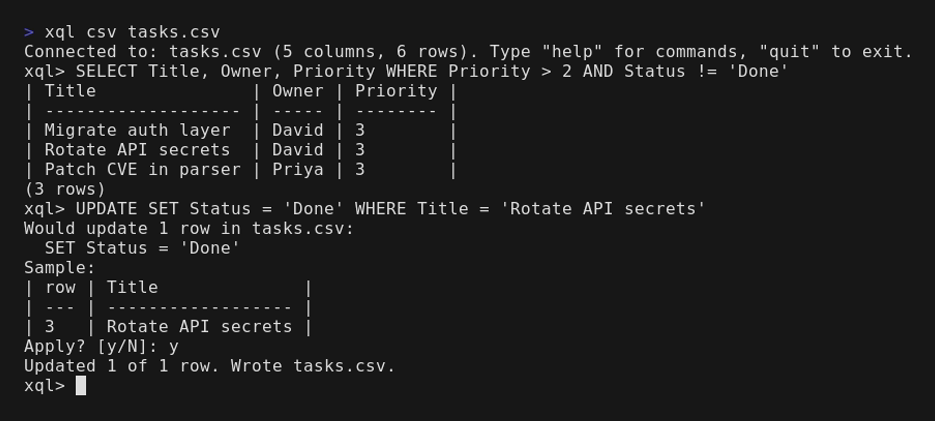
A real SQL prompt for SharePoint
xql binds to a SharePoint list through Microsoft Graph with device-code sign-in, then runs SELECT, UPDATE, DELETE, and INSERT against it. WHERE predicates translate to OData $filter and run server-side, so even large lists return quickly rather than dragging every row across the wire. The same binary runs against local CSV files with identical grammar, which makes it easy to prototype a query offline before pointing it at a live list.
Writes preview by default. xql parses the statement, prints the affected row count and a sample of what would change, then prompts before committing. One-shot mode (--exec) requires an explicit --commit instead, with a separate --confirm-destructive gate before a bare DELETE will run. The intent is that you never change data you didn't mean to.
The REPL speaks SQL plus a set of sqlite-shaped meta-commands — mode, headers, output, once, describe, refresh — and renders results as an ASCII table, TSV, CSV, or JSON. It is written in pure Go with no runtime dependencies: a single binary, nothing to install alongside it.
See it in action
A short session against a CSV file — the same grammar works unchanged against a SharePoint list.

For the full walkthrough — signing in, binding to a list, and the preview-before-write loop on your first UPDATE — read the introduction.
The querying member of the tabular family
xql is one of a small family of tools for messy tabular data, split by what changes. xray observes — it profiles the file and changes nothing. xled edits cell values in place, sed and awk for tables. xshape changes the shape of the grid and never touches the values. xql queries the row set — filter, aggregate, group, join. The same care shows up in a graphical editor, too: Comma, a native GNOME grid for delimited files, for when you would rather see the whole file and edit it by hand.
What makes xql the query verb is the same thing that makes it work against SharePoint: the backend is only where the rows happen to live. The same SELECT runs against a CSV on disk, a SharePoint list over Graph, or an xinglist, and the SQL does not change shape to suit any of them. So reach for xql when the question is about which rows — and when the answer is that a value is wrong, or the columns are in the wrong places, hand off to xled or xshape and come back.
Install
With Go (1.24 or later)
go install github.com/excelano/xql/cmd/xql@latest
On Debian or Ubuntu
Install from the Excelano apt repository so apt upgrade keeps it current:
curl -fsSL https://excelano.com/apt/setup.sh | sudo sh
sudo apt install xql
With Homebrew
On macOS or Linux, so brew upgrade keeps it current:
brew tap excelano/tap
brew trust excelano/tap   # one-time: Homebrew gates third-party taps behind explicit trust
brew install xql
On Windows
With WinGet, so winget upgrade keeps it current:
winget install Excelano.xql
Prebuilt binaries
Linux and macOS builds for x86_64 and arm64 are on the GitHub releases page. There is also a one-line convenience installer; see the README for it, and for version pinning and custom install directories.
Behind the tool
I built xql because getting data out of SharePoint shouldn't mean writing a throwaway script every time. That friction — SharePoint, Graph, Power Automate, the gap between where your data lives and where you can actually use it — is what I do for clients as an independent Microsoft 365 builder — work like the talent-lifecycle system I built for an LNG operator, where scattered people data became a working source of truth.
If your team is fighting the same friction, I'd be glad to help you put it behind you for good.
For technical users
xql is open source under the MIT license, written in pure Go with no runtime dependencies. The full source, the grammar reference, and the backend documentation live at github.com/excelano/xql. The security policy and supported versions are in SECURITY.md.