A tool from Excelano
xled
sed and awk for tabular data.
xled brings the muscle memory of sed and awk to CSV and DSV files. It borrows awk's field model, sed's s/// substitution, and ed's live in-memory buffer, and points all three at Excel-style ranges — a column by letter or name, a row span, a rectangle, a regex-selected set of cells. You address part of the table, give it a command, and see the result before anything is written.


The tool in between
Spreadsheets that arrive as CSV are full of small, repetitive damage: a dollar sign glued to every number, a leading apostrophe, inconsistent casing, a header buried under three title rows. The usual reach for these is a throwaway pandas script or a fragile awk -F, one-liner that mishandles the first quoted comma. xled is the tool in between — faithful CSV parsing, two-dimensional addressing that matches how you already think about a sheet, and a transform vocabulary small enough to keep in your head.
A statement is address command, one per line. The address picks the cells; the command acts on them. Positional addresses are bare and names are bracketed — that one rule resolves every ambiguity a real header throws at you, so the column at letter B is B while the column named B is [B], and names match exactly because a header is data and silent case-folding is the same class of surprise as dropping a leading zero.
It is deliberately not a query engine. xled rewrites cells and reshapes nothing — it never adds or removes rows behind your back, never reorders columns, never coerces a value you didn't ask it to. Join, group, aggregate, and sort belong to SQL; xled hands those off to xql and DuckDB by name rather than growing into them.
See it in action
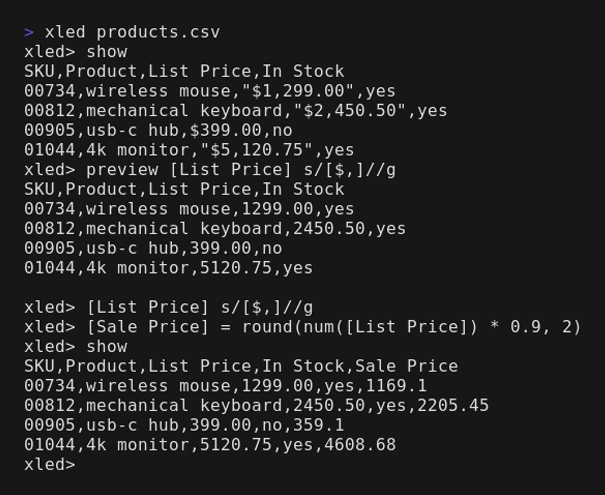
An application-portfolio export, the kind of file I clean for a living: a currency column with dollar signs and thousands separators glued to every value. Show the column, then strip the formatting in one substitution.
$ xled '[annual_cost]' app-portfolio.csv
annual_cost
"$1,250,000"
"$89,500"
$12000
"$45,000.00"

$ xled '[annual_cost] s/[$,]//g' app-portfolio.csv
app_name,owner,annual_cost,status,last_reviewed,criticality
SAP ERP,Finance Dept,1250000,Active,2024-03-15,High
Legacy CRM,j.smith@corp.com,89500,active,03/15/2024,high
TimeTracker,IT Operations ,12000,IN USE,2024-01-02,Medium
The substitution touches only the addressed column; every other cell round-trips byte-for-byte, quoted fields and leading zeros intact. Run it against a file and the result goes to stdout, clean and ready to pipe; open the file with no script and you get an interactive prompt that previews each edit, keeps an undo stack, and writes only when you tell it to.

For the full tour — two-axis addressing, the compute layer, and the verbs that tame a buried header — read the introduction. If you know sed and awk, it is a short read.
A compute layer that won't lie to you
Beyond substitution, = expr computes a value into a column, creating it if it's new. Values are one of three types — string, number, bool — and there is no automatic coercion: arithmetic requires numbers, and you cast explicitly with num(). That is what keeps leading zeros and long identifiers intact instead of quietly turning 00042 into 42.
$ xled '[total] = round(num([price]) * 1.0825, 2)' products.csv
name,category,price,sku,total
Widget Pro,tools,19.99,TL-0042,21.64
Gadget,gizmos,9.50,GZ-0101,10.28
Pro Hammer,tools,29.99,TL-0099,32.46
The sku column is untouched — a SKU is an identifier, not a number, so xled leaves it alone. Currency is rounded only because round(…, 2) asked for it; xled never rounds on write, because inventing precision you didn't ask for is the same betrayal as silent coercion. A cast that fails is non-halting: the cell is left as it was and a tally tells you how many were skipped.
The value-editing member of the tabular family
xled is one of a small family of tools for messy tabular data, split by what changes. xray observes — it profiles the file and changes nothing. xled edits cell values in place, sed and awk for tables. xshape changes the shape of the grid and never touches the values. xql queries the row set — filter, aggregate, group, join. The same care shows up in a graphical editor, too: Comma, a native GNOME grid for delimited files, for when you would rather see the whole file and edit it by hand.
The line that keeps xled focused: it rewrites what is in the cells and never moves them. Splitting one column into several, unpivoting a year-per-column spread, transposing — those change the geometry, so they belong to xshape. Filtering, grouping, and aggregating produce a different row set, so they belong to xql. xled shares its column-addressing dialect with xshape, so pointing at a column in one tool points at it identically in the other; the family reads as one language with different verbs.
Install
xled is a single binary for Linux, macOS, and Windows, with nothing to install alongside it.
On Debian or Ubuntu
Add the Excelano apt repository once, so apt upgrade keeps it current:
curl -fsSL https://excelano.com/apt/setup.sh | sudo sh
sudo apt install xled
With Homebrew
On macOS or Linux, so brew upgrade keeps it current:
brew tap excelano/tap
brew trust excelano/tap   # one-time: Homebrew gates third-party taps behind explicit trust
brew install xled
On Windows
With WinGet, so winget upgrade keeps it current:
winget install Excelano.xled
With cargo
If you have a Rust toolchain, install the published crate from crates.io. This compiles from source rather than fetching a prebuilt binary, so it is slower than the installer above but needs nothing else:
cargo install xled
Prebuilt binaries
Raw tarballs for every platform are on the GitHub releases page. To build from source you need only a Rust toolchain; the README covers it.
Behind the tool
I built xled because the gap between a messy export and a usable file is where I lose an afternoon I didn't budget for — and because a tool that addresses a spreadsheet the way you actually think about it had no business not existing. The discipline underneath it is one I hold firmly: a tool should never change a value you didn't ask it to. No silent coercion, no invented precision, no rows reshaped behind your back.
Cleaning portfolio exports, normalizing inventories, and untangling the data that falls out of Microsoft 365 is a real part of what I do for clients. If you have a pile of that work and would rather hand it to someone who treats the data with care, that's the kind of thing I'm glad to take on.
For technical users
xled is open source under the MIT license, written in pure Rust over four crates — regex, csv, clap, and rustyline — with no C dependencies and no runtime. It is a hand-written recursive-descent parser over a stringly-typed buffer, with a resolver that turns any address into a set of cell coordinates and an executor that applies each command under a scope contract. The full source, the grammar reference, and the design notes live at github.com/excelano/xled; the security policy is in SECURITY.md.