A tool from Excelano
nved
A line editor you can climb into.
A small terminal text editor that feels like a REPL rather than a full-screen application. Print a range of lines by number, climb into the printed block with the arrow keys, and edit it in place. There is no alternate screen and no takeover of your terminal — output scrolls normally and your scrollback stays intact, the way cat or an old line editor leaves it.
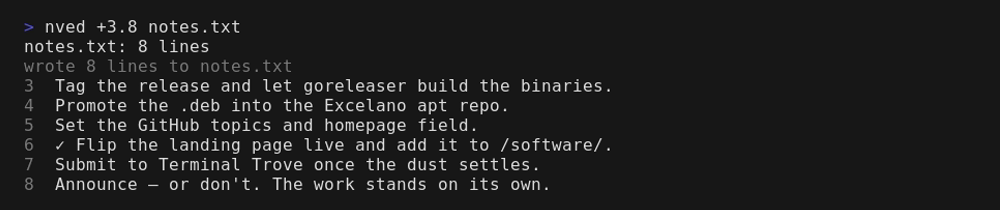
Print a range, climb in, edit in place
Start nved with a file and you're at a > prompt where you address lines by number: 42 prints line 42, 10.30 prints ten through thirty, tail brings the last screenful on screen, $-9.$ the last ten lines. The block prints just above the prompt — then you climb into it with the arrow keys and move a real cursor through the text, changing it directly. Enter splits a line, Backspace joins, Ctrl+U undoes, Ctrl+S saves in place without leaving. Step off the bottom and you're back at the prompt.
It is deliberately small and single-purpose: one window, one buffer, best suited to dialing in a specific part of a file by line number rather than scrolling through a large one. It is a from-scratch descendant of ved, the ed clone — where ved replays commands against text, nved lets you move a cursor through committed lines and edit them in place.
See it in action
Print a range, climb into the block, edit a line, and save — the prompt and your scrollback never leave the screen.

New to this style of editing? The introduction takes you from the first prompt through addressing a range, climbing in to edit, and the column-aware CSV view — to a saved file.
It reads CSV, too
A .csv is just a text file, so nved opens it as plain text until you ask for more. Type csv and the printed block renders as aligned columns with a pinned header; climb in and you edit cell by cell, Tab moving field to field, the grid re-aligning as you type. Underneath the csv preset are independent switches — the delimiter, quoting, headers, the record separator — so a tab file is tsv and an ASCII-separated one is asv. The columns command draws a faint letter ruler over the grid, naming the columns A, B, C the way a spreadsheet does, so whole-column edits have something to point at. The display always shows the data raw: quoted cells keep their quotes, and the delimiter is drawn faint in the gap between columns, so you see exactly what separates the fields.

Install
nved is a single Go binary with nothing to install alongside it.
On Debian or Ubuntu
Add the Excelano apt repository once, so apt upgrade keeps it current:
curl -fsSL https://excelano.com/apt/setup.sh | sudo sh
sudo apt install nved
With Homebrew
On macOS or Linux, so brew upgrade keeps it current:
brew tap excelano/tap
brew trust excelano/tap   # one-time: Homebrew gates third-party taps behind explicit trust
brew install nved
On Windows
With WinGet, so winget upgrade keeps it current:
winget install Excelano.nved
From source
With a Go toolchain (1.25 or newer), go install github.com/excelano/nved@latest builds and installs it. The full source is on the GitHub page.
Behind the tool
Full-screen editors take over the terminal: they clear the screen, hide your scrollback, and hand it back only when you quit. nved keeps the conversation going instead — you print what you want to see, it stays on screen, and you climb into it to edit. It is the editor I reach for when I want to fix a few lines without losing the context around them, and I built it because that small, low-ceremony way of working didn't exist in the shape I wanted.
That instinct — sweat the small interactions, make the thing pleasant to live in — is what I bring to everything I build. If you want software made with that kind of care, that's the work I do.
For technical users
nved is open source under the MIT license, written in pure Go. The full source and design notes live at github.com/excelano/nved. Its older sibling, ved, is a drop-in ed clone in pure-stdlib Rust — same family, different surface.