Writing · July 6, 2026
Power Automate flows you can put in a pull request
Somewhere in every Microsoft 365 shop there's a Power Automate flow that matters. It routes the approvals, or files the intake, or nudges an owner when something goes overdue. It was built once, in the designer, and it has been quietly running ever since. Then comes the day you have to change it, or explain it, or hand it to the next person — and you discover how little the designer gives you to work with.
The designer is a web form. You open the flow and you're clicking down through nested cards, expanding one action at a time. There's no way to see the whole thing at once. There's no diff when a teammate changes something, and no history of what it used to do. There's no review before a change goes live, no reuse of the piece you already solved in another flow, and no clean way for two people to work on the same flow without stepping on each other. For anything past a toy, that's a real ceiling.
You can export the flow, but what comes out is a definition.json — hundreds of lines of deeply nested machine JSON that nobody reviews by hand. It's a backup format, not something you read. So the flow that runs a piece of your business lives in exactly one place, understood by exactly one person, with no record of how it got the way it is.
So I made the flow something you write and read as code.
paxc compiles a small, readable language called pax into the exact definition.json that Power Automate expects. You write the flow as text — variables, loops, conditions, connector actions — and compile it. A daily task digest looks like this:
var tasks: array = [
  "Renew the excelano.com certificate",
  "Review the open paxc pull request",
  "Back up the production database",
]
var summary: string = ""

foreach task in tasks {
  summary &= "- " & task & "\n"
}

pa Send_an_email
Eleven lines you can read top to bottom. The single email action at the end, once paxc has expanded it into what the platform actually wants, looks like this — and it's the small one:
"Send_an_email": {
  "type": "OpenApiConnection",
  "inputs": {
    "parameters": {
      "emailMessage/To": "team@example.com",
      "emailMessage/Subject": "Today's tasks",
      "emailMessage/Body": "<p>@{outputs('Compose_summary')}</p>",
      "emailMessage/Importance": "Normal"
    },
    "host": {
      "apiId": "/providers/Microsoft.PowerApps/apis/shared_office365",
      "operationId": "SendEmailV2",
      "connectionName": "shared_office365",
      "connectionReferenceName": "shared_office365"
    }
  },
  "runAfter": { "Compose_summary": [ "Succeeded" ] }
}
A fifteen-line pax flow compiles to a 157-line definition.json. You write and review the version a person can hold in their head; the platform gets the verbose version it insists on. Nobody has to build that by hand in the designer, and nobody has to read it back.
Because the source is text, the flow can live in git like the rest of your work. A change is a diff you can actually read. It goes through a pull request before it ships, so a second person sees it and the history is kept. The companion interpreter, paxr, runs the same source locally, so you can iterate on the logic without round-tripping to the cloud for every small fix.
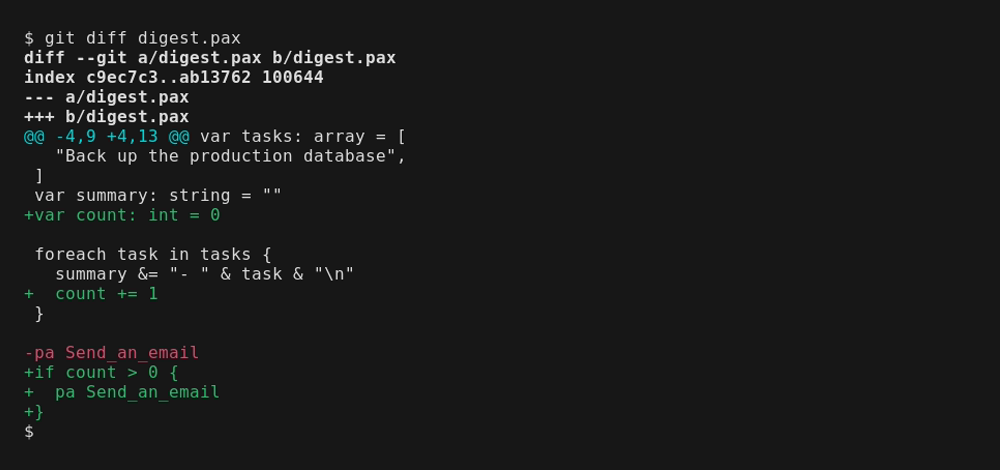
And you don't have to start over to get there. paxc --decode takes a flow you already have in Power Automate and writes pax source back out, so an existing estate comes under version control as it stands instead of being rebuilt from scratch.
paxc is a single tool, open source under the MIT license, written in pure Rust. The install steps, the full language reference, and a tutorial that grows one flow from a single line into a scheduled, looping digest are on the paxc page.
I built it because automation is code, and treating it as a web form is why so many Power Automate estates rot: no history, no review, no reuse, and every flow understood by one person until the day they leave. The designer is a fine place to start a flow. It is a bad place to keep one that a team has to depend on.
That gap — between where Power Automate lets you click a flow together and where you need to engineer one a team can maintain — is most of what I do for clients. Power Automate, SharePoint, Graph, and the wiring between them. If your organization is building on Power Automate and feeling that ceiling, that's exactly the kind of work I like being brought in on.