An app from Excelano
Unitempo
Meetings across time zones, in UTC.
“How about 15:00 UTC on Friday?” One time, the same for everyone, with no back-and-forth about time zones and daylight saving. Unitempo is a calendar over the one you already have, Google, Microsoft, iCloud or CalDAV, that shows and schedules every meeting in UTC with your local time beside it. For Linux and Windows.

See how to get it.

One time for everyone
Scheduling across time zones goes wrong in the conversion. Houston says 7 in the evening, Berlin hears 2 in the morning, and the week the clocks change in one country and not the other, somebody turns up an hour early. UTC has none of that. It is the same everywhere, it never changes for summer, and “15:00 UTC” means one moment to everyone who hears it.
Unitempo makes UTC the time you work in. You agree on a time in UTC, on a call, in a chat, wherever, and create the meeting in Unitempo at that time. The invitation goes out through your own Google, Microsoft, iCloud or CalDAV calendar, as any invitation from it would, and the people you invite see it in their own calendar in their own local time. They never need Unitempo.
See it in action
What you can do
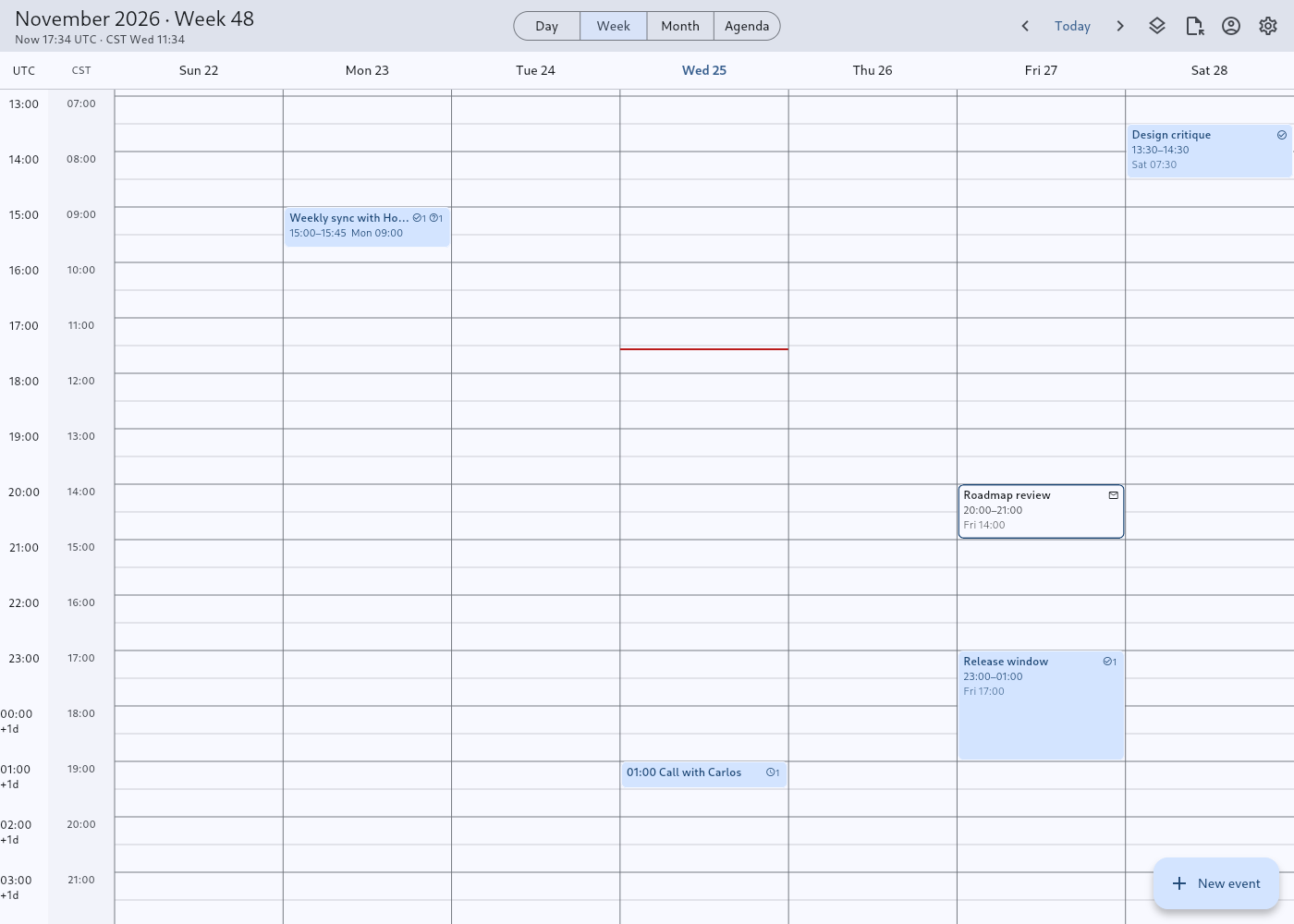
See your calendar in UTC
Day, week, month and agenda views of every calendar you connect, with UTC first and your local time beside it. Days start at your local midnight, so an evening meeting stays on the evening it happens; one setting divides them at midnight UTC instead.
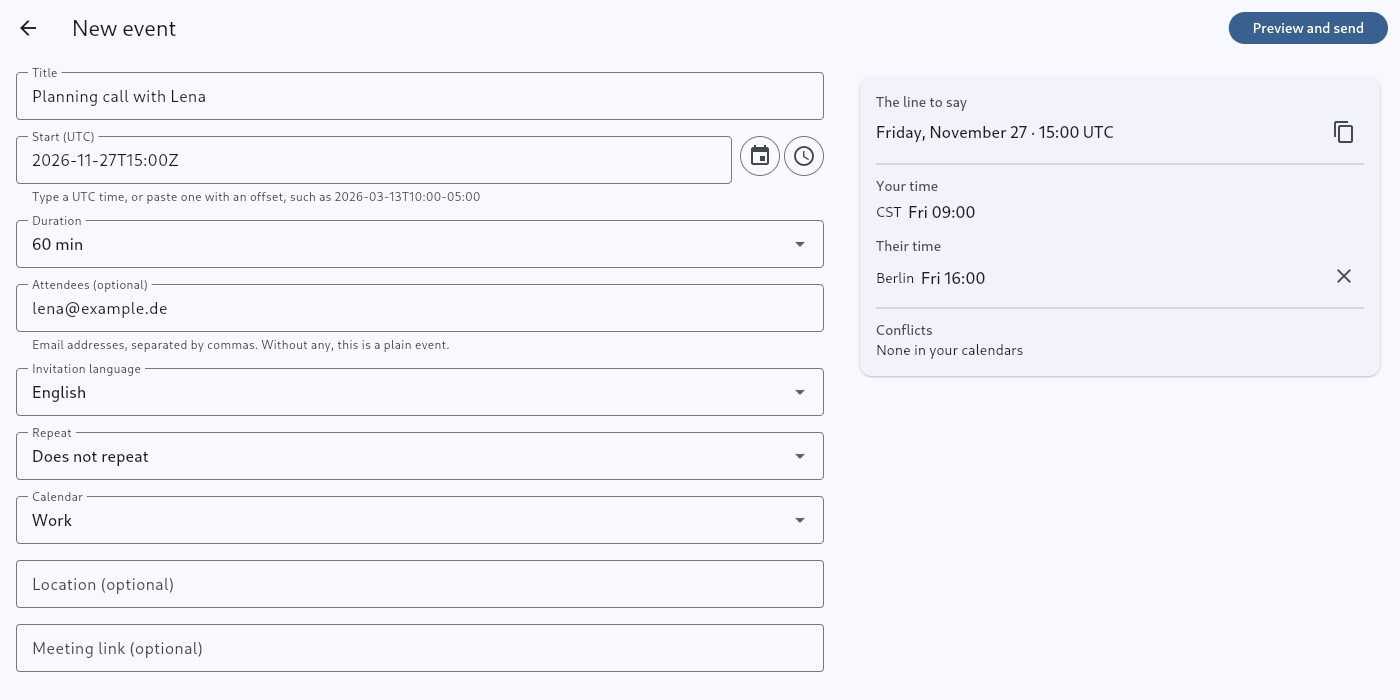
Schedule in UTC
Pick or type a start in UTC, or paste a time from a message and have it converted. Beside it you see your local time, a counterpart’s if you pick their zone, a flag when the date differs locally, and any clash with your own calendars.
The line to say
Every time comes with the line to say or paste, “Friday, March 13 · 15:00 UTC”, in English or German, whatever language the app itself is in. The invitation carries a short line telling the people you invite that their calendar shows it in their local time.
Your own calendars
Google, Microsoft 365 and Outlook.com, iCloud, and any CalDAV server, several at once, with any calendar hidden when you do not need it. Public calendars, such as a holiday feed, can be added by their address.
Answer invitations
Accept, decline or answer tentatively, and see each attendee’s answer on your own meetings. Invitations that arrive by mail, in an inbox Unitempo watches or as a file you open, wait in Unitempo until you answer them.
A preview before anything is sent
When a meeting has attendees, Unitempo shows what will go to them before it goes, for a new invitation, a change or a cancellation. The invitations themselves are sent by your calendar provider.
No server. No account. Nothing to send.
Unitempo talks only to the calendar and mail services you sign in to. Your events stay with your calendar provider: Unitempo reads them into memory to show them and keeps no copy. Your sign-ins are held in your operating system’s secret store. There is no Unitempo server, no account to create with us, no analytics, no telemetry, and no crash reporting.
The full statement, including what Unitempo does with Google user data, is at excelano.com/legal/#unitempo.
How to get it
Debian and Ubuntu
Unitempo is packaged for the Excelano apt repository. Add the repository once, then install; updates arrive with apt upgrade like any other package:
curl -fsSL https://excelano.com/apt/setup.sh | sudo sh
sudo apt install unitempo
Once installed, Unitempo opens .ics invitation files from your mail client and file manager. The package is built for amd64.
Behind the tool
I work with people across several time zones, and the slowest part of arranging a call was never finding the time. It was the round of messages making sure everyone meant the same one. Unitempo settles that by giving everyone one clock to name the time in, while leaving every invitation in the calendar it already lives in. If coordinating work across time zones and systems is a problem your team has, it is the kind of problem I like to take on.
Support
For questions, bug reports, or feedback, use the support form or email support@excelano.com. Replies typically arrive within one business day.
Unitempo is an independent app and is not affiliated with or endorsed by Google, Microsoft or Apple. Google Calendar, Microsoft 365, Outlook.com and iCloud are trademarks of their respective owners.