A tool from Excelano
plene
Rust in longhand.
plene shows Rust source alongside an expanded transcription: the same code, with Rust's abbreviations and symbols written out as words. Each line that changes is followed by its longhand, so &mut text reads borrow mutable text and -> reads returns. It is for someone who knows some Rust and finds the dense parts slow going.
Spelled out, not explained
plene is not a translator or a tutor. It spells out what is written and does not explain what it means. Rust's own abbreviations become words (fn is function, pub is public, impl is implement), and so do the symbols that carry meaning Rust never names: ? reads or return early, => reads gives, ..= reads through. Abbreviations that every language shares, such as struct, enum, i32 and Vec, stay as they are, because structure and enumeration would make the code harder to read. Identifiers, strings, comments and indentation are never touched.
Every expansion depends on the role a token plays, not on its text. & in an expression reads borrow, while & in a type reads borrowed, and & between two numbers reads bitwise and. The same token in the same role always gets the same words, so once you have learned what plene writes for something, it writes it that way everywhere.
See it in action
Two small functions, as plene prints them. Lines marked » are the longhand; lines with nothing to expand appear once.
$ plene src/config.rs read_config(path: Path) Result<String, io::Error> { » read_config(path: Path) Result<String, io::Error> { let text = String::new(); » let text = String::new(); File::open(path).read_to_string( text); » File::open(path).read_to_string( text) ; Ok(text) } Config { » Config { enabled(self) Iterator<Item = str> { » enabled( self) Iterator<Item = str> { self.flags.iter().filter(f f.is_empty()).map(f f.as_str()) » self.flags.iter().filter(f f.is_empty()).map(f f.as_str()) } }
The first ? on the File::open line stays as written, because a method is called on its result and or return early would land in the middle of the chain. The last one expands. --side-by-side puts the original and the longhand in two columns, --expanded prints only the longhand, and --changed-only keeps just the lines that change. plene - reads standard input, and in a terminal the longhand is colored to match the original.
In a window
plene-gui puts the source and its longhand side by side, one row per source line, so a line and its longhand stay level however far either one wraps. Every token plene expands is underlined on both sides. Hold the pointer over one and a card shows the token, the words plene writes for it, the role it plays, and a line from the glossary on what it does.
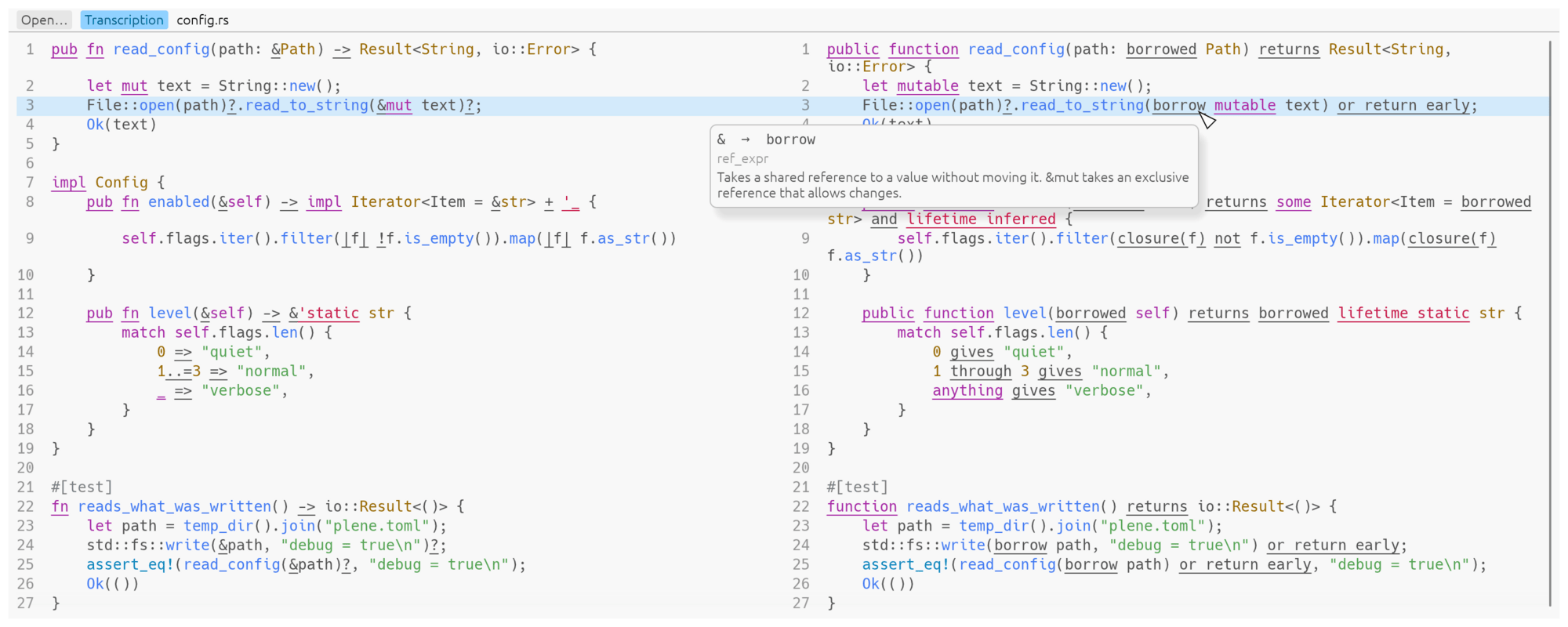
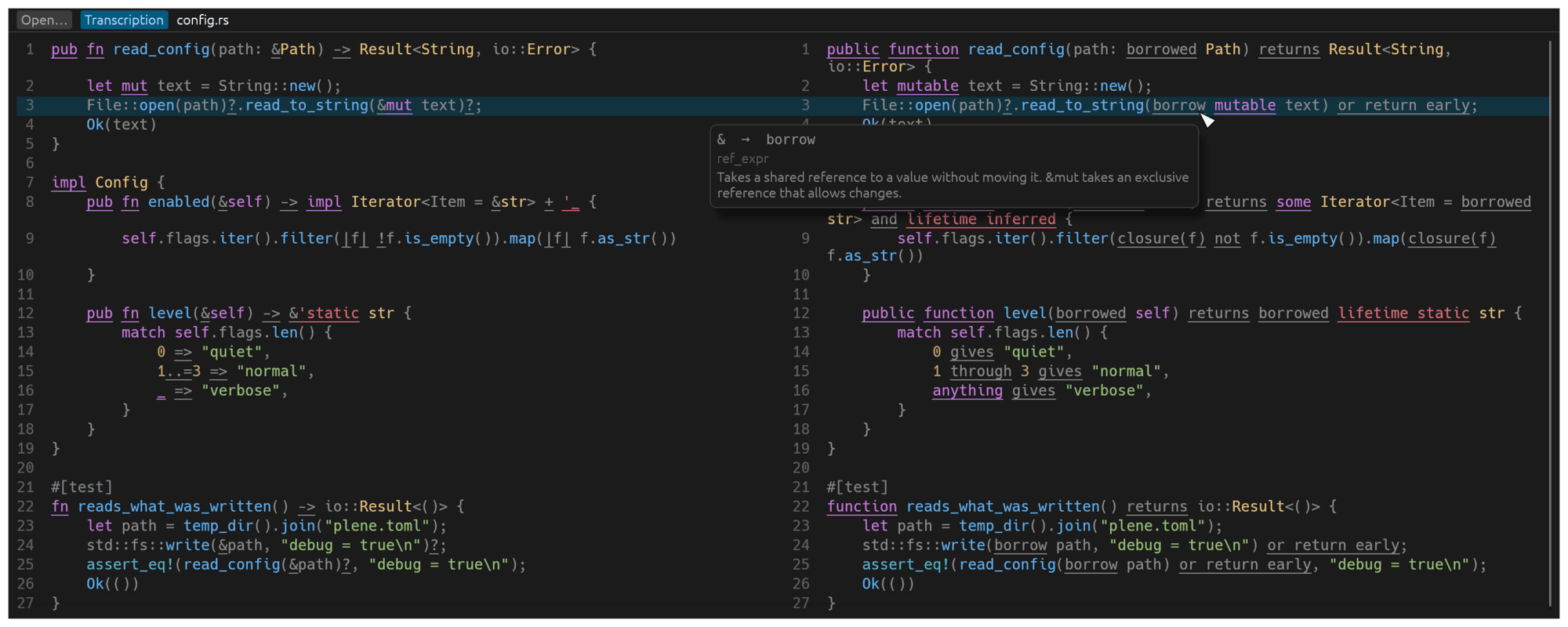
& in &mut text, with its card: it reads borrow, plays the role ref_expr, and takes a shared reference.A click marks a row across both panes, and the arrow keys move the mark; Page Up and Page Down turn the page. The Transcription button hides the right-hand pane when the source alone will do. A file opens from the command line, from the Open button or Ctrl+O, or by dropping it on the window.
The name
Hebrew is usually written without its vowel marks. Plene spelling, ktiv male or “full spelling”, makes up for them by adding the letters vav and yod to stand for vowels: the same words in the same language, easier to read. plene does that for Rust.
The approach is also inspired by Jeff A. Benner's Mechanical Translation of the Hebrew Bible, which renders each Hebrew word the same way every time it appears, in the order it appears, so that a reader without Hebrew can see how the original is built.
Install
The command-line tool is published three ways: as a crate, as an apt package, and as a Homebrew formula. The window is published as a crate and an apt package of its own.
From crates.io
With a Rust toolchain, cargo builds plene from the published crate:
cargo install plene
From the Excelano apt repository
Add the repository once, so apt upgrade keeps plene current:
curl -fsSL https://excelano.com/apt/setup.sh | sudo sh
sudo apt install plene
From the Excelano Homebrew tap
Tap it once, so brew upgrade keeps plene current:
brew tap excelano/tap
brew trust excelano/tap   # one-time: Homebrew gates third-party taps behind explicit trust
brew install plene
The window
plene-gui is its own package, so a machine that only wants the command line never takes on a display stack. With a Rust toolchain:
cargo install plene-gui
Or from the apt repository, once it is added as above:
sudo apt install plene-gui
The Homebrew tap carries the command-line tool only, so on a Mac the window installs with cargo.
Behind the tool
I love Rust, and more and more of what I build is written in it, but my reading is still catching up. Some of the syntax is hard to parse, especially in code I didn't write, where one line can pack a borrow, a lifetime and an early return into a handful of symbols. I built plene to make that reading easier.
It is meant for someone who already knows Rust and wants help reading other people's code. The longhand is there to help you understand a line, not to replace it: plene only displays and never writes a file, and the code you go on to review, change and compile is the original.
For technical users
plene is open source under the MIT license, written in Rust. It parses with the syntax crate from rust-analyzer, classifies every token by the role it plays in the tree, and renders each role through a glossary. Joining the original text of every span reproduces the input byte for byte, and the test suite holds that over the whole of the Rust standard library and a corpus of large crates. The window is built on egui and draws the same spans, so its colors and underlines match the terminal's.
The expansions come from a glossary built into plene. Any entry can be overridden by token and role in ~/.config/plene/glossary.toml or in a file passed with --glossary, and plene --dump-glossary prints the glossary in effect as a starting point. The source, and the design notes on what is expanded and why the glossary reads as it does, live at github.com/excelano/plene; the security policy is in SECURITY.md.